Skip to content

Send SMS from your own Android phone, from the web or your code.

Messages go out through your SIM plan, with your number. We add €0.005 per SMS. No subscription.

The SMS Flow dashboard: a reminder for Elena written on the web, to be sent by an online Xiaomi phone. 72 characters, 1 segment, €0.005.
The Send page. The price and segment count show up before you send.

What 1,000 messages a month cost

Example: 1,000 short SMS (up to 160 characters, one segment each)

SMS Flow fee
1,000 × €0.005€5.00
Carrier
your SIM plan, as usual
You pay
€5 + your SIM plan

A typical SMS API charges for every message it carries on its own network. To EU numbers that is usually several cents per SMS, so check your provider's price list. With SMS Flow the carrier part is your own SIM plan, and many plans include a large number of SMS.

  • From €10, with PayPal

    A prepaid balance. Credits do not expire.

  • Unsent messages refunded

    If a message fails before your phone sends it, its cost goes back to your balance automatically.

  • Sent from your number

    Recipients see your SIM number and can reply to it.

  • No subscription

    No monthly fee and no minimum. Pay for what you send.

Set it up once

  1. Install the app on an Android phone

    Google Play for messaging and web sync, or the Full app from smsflow.app for campaigns and the API.

    Compare the two apps
  2. Sign in on the phone

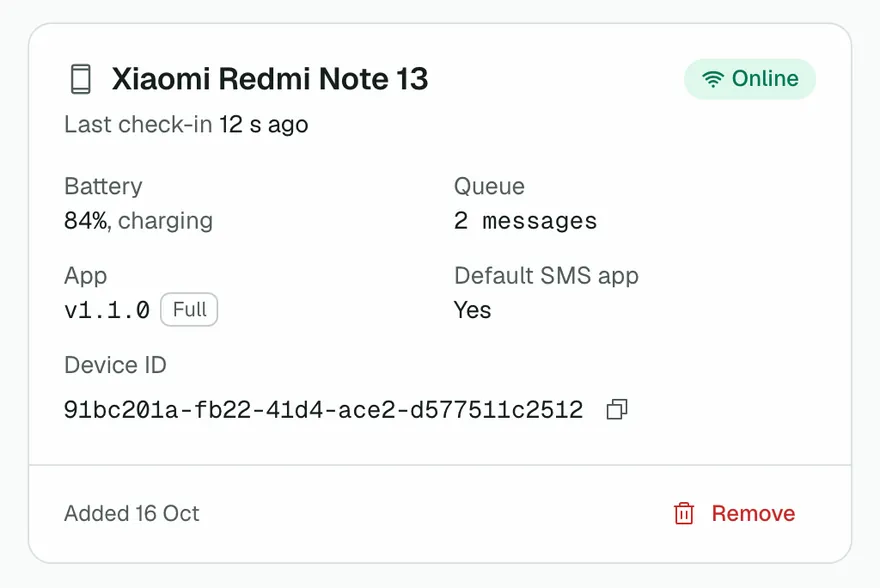
    It shows up under Devices with its last check-in, battery and queue.

    A phone in the Devices list: online, last check-in 12 seconds ago, battery 84% and charging, 2 messages in the queue, app version 1.1.0 Full.
  3. Send from the dashboard or the API

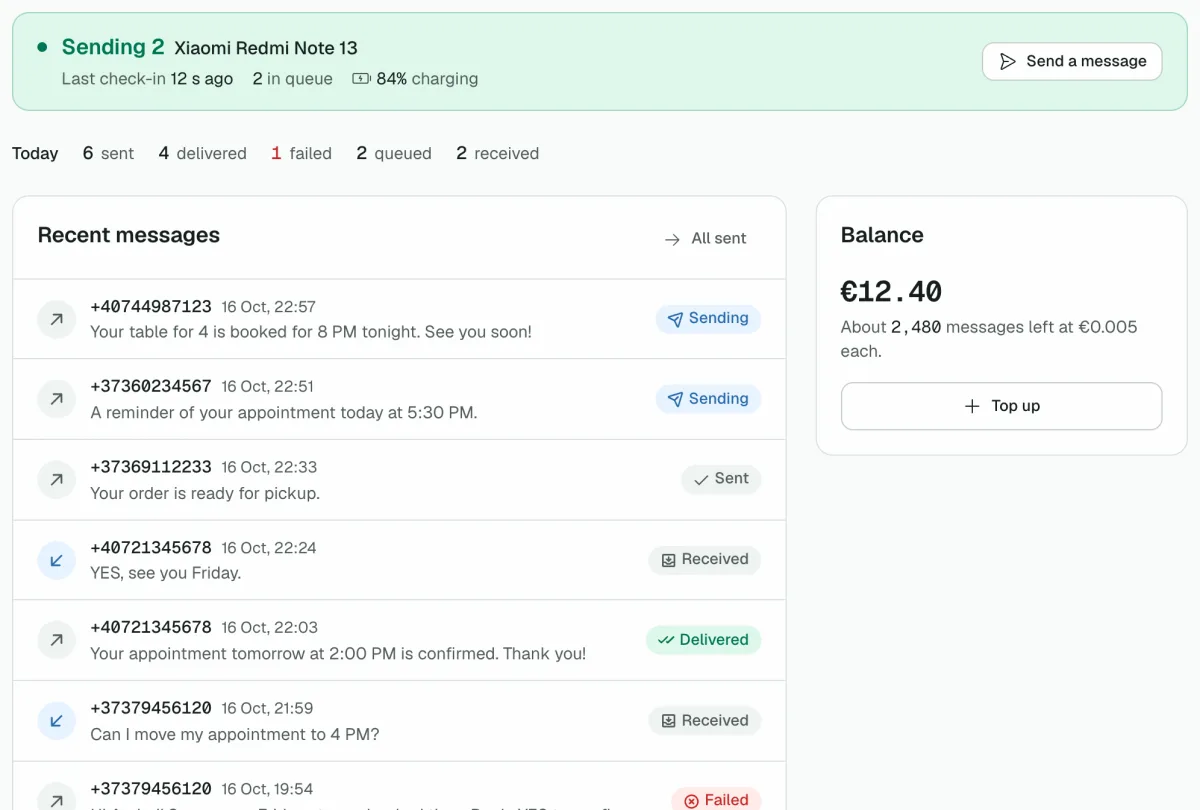
    Every message shows what happened to it: queued, sent, delivered, or failed with the reason.

    The dashboard home: the phone is sending 2 messages, and a list of recent messages marked queued, sent, delivered, received or failed.

Two jobs it does well

Appointment reminders for a salon or clinic

Import your clients into a contact list, write the reminder once with their first name, and schedule the campaign for the evening before.

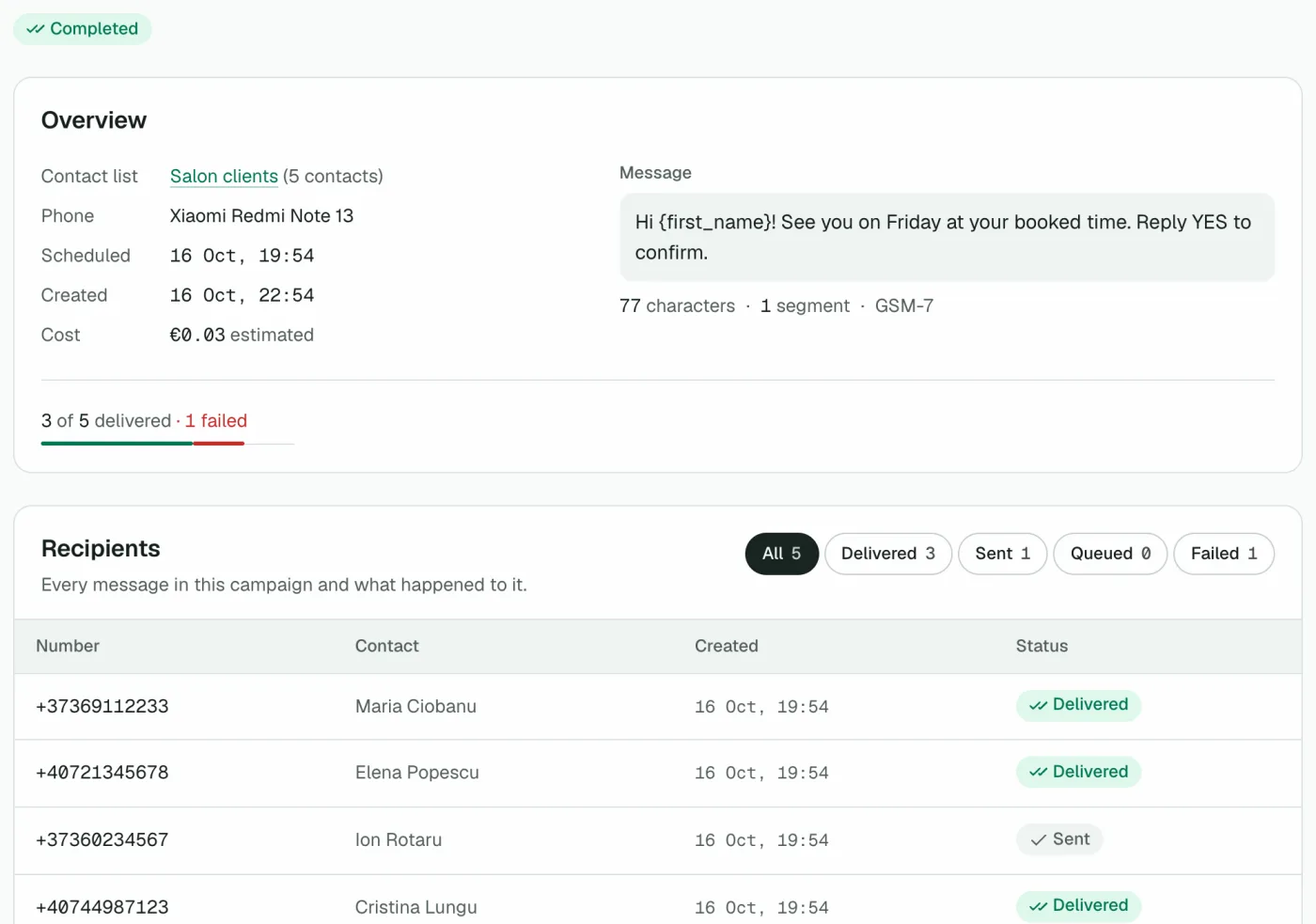
Anyone who replies STOP goes on your opt-out list and is skipped next time. Each recipient shows delivered, sent or failed.

Campaigns need the Full app.

A completed campaign called Friday reminders to the list Salon clients: 3 of 5 delivered, 1 failed, with the status of every recipient.
Your shop sends
curl https://smsflow.app/api/v1/send \
  -H "X-API-KEY: $SMSFLOW_API_KEY" \
  -H "Content-Type: application/json" \
  -H "Accept: application/json" \
  -d '{
    "device_id": "91bc201a-fb22-41d4-ace2-d577511c2512",
    "to": "+40721345678",
    "message": "Comanda 1042 a fost expediata. Livrare joi."
  }'

# 200 OK
{ "message": "SMS queued successfully", "sms_id": 18734, ... }
Your webhook receives
POST https://your-shop.example/smsflow
X-SmsFlow-Event: message.status

{ "event": "message.status", "id": 18734, "status": "delivered",
  "recipient": "+40721345678", "source": "api", ... }

Order updates from your online shop

When an order ships, your shop calls the API with the customer's number. You get the message id back right away.

SMS Flow then calls your webhook each time the status changes, and can forward customer replies to your server.

The API and webhooks need the Full app.

Read the API docs

What we store, and what the app can do

Message text and numbers
Stored so the phone can send them and you can see your history. Text older than 365 days is deleted automatically; you can choose from 30 days to 10 years.
Your contact lists
They stay in your account. You decide who gets messages; we only process them to send what you ask.
Export or delete
In Settings, Account: download everything as a ZIP, or delete the account with its messages, contacts and phones.
Android permissions
SMS (to work as your SMS app), contacts for names, phone state to pick the SIM, notifications. The Full app also keeps a foreground service running.
Google Play app
Uploads SMS to your account only after you turn on web sync in the app. Until then, messages stay on the phone.
Analytics
Google Analytics runs only if you accept it in the cookie banner. The dashboard has no analytics.

Read the Privacy Policy

What it can't do

Better to know now than after the first campaign.

  • The phone must be on and online

    Keep it charged and connected. Messages wait in the queue while it is offline.

  • Your carrier sets the limits

    Many plans cap SMS per day or forbid bulk sending. Check yours first.

  • Delivery is not guaranteed

    You see what the carrier reports: sent, delivered or failed.

  • Android only

    The sending phone must run Android. There is no iPhone app.

  • Marketing needs consent

    Under GDPR, promotional SMS go only to people who agreed to receive them.

  • The Google Play app is for messaging

    It sends messages written in the dashboard when the phone checks in. Campaigns and the API need the Full app.

Pricing

Prepaid. No subscription, no monthly minimum.

Each SMS you send
€0.005
per segment, from the dashboard, API or campaigns
Messages you receive
€0
in the web inbox
Received SMS forwarded to your webhook
€0.003
per segment, Full app only

Top up from €10 with PayPal. Messages that fail before leaving your phone are refunded automatically. Your carrier bills your SIM plan as usual.

Create free account

Need something built around SMS Flow? Contact us.

Questions people ask first

All questions

It can. Carriers set fair-use limits on SIM plans, and some do not allow bulk or automated sending on consumer plans. Read your plan's terms, send campaigns only to people who agreed to receive them, and start with small volumes. If the carrier rejects a message, it is marked as failed and its cost goes back to your balance.

Your own phone number: the number of the SIM card in the phone that sends the message. SMS Flow does not rent out numbers or sender names, so replies come back to that SIM and appear in your inbox.

Messages wait in the queue and the phone sends them when it is back online. The dashboard warns you when a phone with waiting messages has not checked in for 30 minutes. Messages still waiting after 24 hours are marked as failed and refunded.

We store the text of the messages you send and receive, because the phone needs it to send them and the dashboard shows your history and inbox. We do not use it for advertising or analytics, and we do not sell it. We look at it only when you ask for support on a specific message or when the law requires it. Text older than 365 days is deleted automatically (you can choose between 30 days and 10 years), and you can export or delete everything from Settings, Account.

Download it only from smsflow.app/download. The page lists the SHA-256 fingerprint of the file and of our signing certificate, so you can check the APK before installing it. Android also refuses an update that is signed with a different key.

Start with the phone you already have.

Create an account, install the app, and send yourself a test message.